

Knowledge Base
Problems with ESET Security Suite 4.0
Question
I just installed ESET Security Suite 4.0, and now PingPlotter (and/or MultiPing) won't work. What do I need to do to fix this?
Solution
There are several solutions to this problem. ESET doesn't like the extra 'padding' we send out in packets > 28 bytes, so you can change PingPlotter's (but not MultiPing's) packet size, or you can change ESET to not look for extra 'cargo'.
Option 1: Changing ESET to allow bigger packets
This is probably the best option, because it allows you to change settings in PingPlotter as needed to do better troubleshooting.
- Open ESET Smart Security 4.0
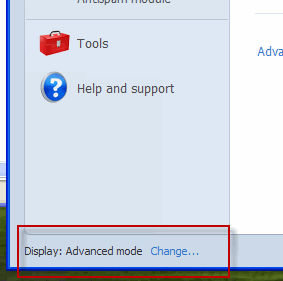
- Make sure you're in 'Advanced' mode (if the bottom left says 'Display: Standard Mode', hit the 'Change...' button).
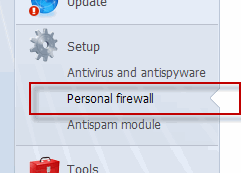
- Click 'Personal Firewall' in the list of things to do on the left under 'Setup'.
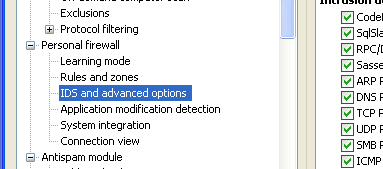
- Click 'Advanced Personal Firewall Setup...'
- Look for (and select) 'IDS and Advanced Options'.
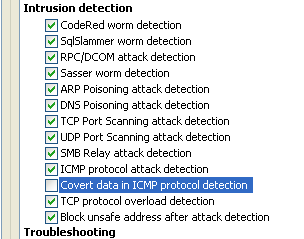
- Find 'Covert data in ICMP Protocol detection'. Turn it off (uncheck it). If this option is unavailable, turn off the 'ICMP Protocol Attack Detection' option instead.
- Hit 'OK'.
- Test PingPlotter/MultiPing - it should work.
Option 2: Change PingPlotter packets to have no cargo.
By default, PingPlotter sends 56 byte packets. ICMP packets only require 28 bytes, though. There is a solid reason for this - intermediate hops and the final destination respond back with the same packet size when using 56 byte packets, but different sizes with any other packet size.
ESET, though, doesn't like the extra bytes sent out, so it's blocking the outgoing packets. You can fix this pretty easily by changing to 28 byte packets.
Note: This option only works in PingPlotter.
- Open PingPlotter
- Go to Edit -> Options.
- Select the 'Engine' section (or Packet, depending on which edition of PingPlotter you have).
- Change the 'Packet size' to 28 bytes.
- Hit 'OK'.
- Test! This should solve the problem.
Don't forget about this in the future if you want to change settings for troubleshooting, or if you create a different named configuration in PingPlotter Pro for some reason.