

Knowledge Base
Alerting on packet loss
Question
Can alerts be configured for packet loss? I see that alerts can be configured on latency, but don't see how to get alerted when packet loss happens.
Solution
You can absolutely alert on packet loss, which is one of the primary things people want/need to be alerted about in PingPlotter and/or MultiPing.
The fields you need to manipulate are in the Alert setup screen is the 'Alert conditions' portion.
Example:
Let's say you want to notify when packet loss equals or exceeds 40%. To do this, set 'Samples to Examine' to 10, and Alert when '4' or more samples are over 9999ms.
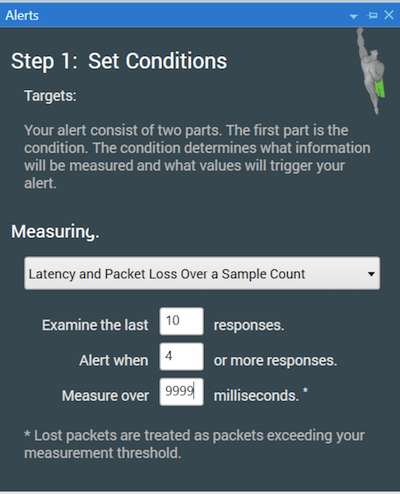
A lost packet always exceeds any number you enter in the threshold area, so if you want to consider only explicitly lost packets, set this to 9999. If you want to consider any really high latency packets as well, set this to something lower (maybe 1000 or 1500). This only examines the last 10 packets, but let's say you want to examine a higher period - and notify on a lower packet loss percentage. Set Samples to examine to 10000 (or some other high number). Alert when '500' or more samples are over 2500ms. This will alert when you hit 5% packet loss over a period of a few hours (depending on what trace interval you use). Once you have your conditions configured, then you can set up any events that are appropriate.
One popular thing to do is to use notification (like email) when conditions start and another when it ends. You get notified, but not overwhelmed.