

Knowledge Base
Packet loss or latency at intermediate hops.
Question
I'm seeing packet loss at one hop in PingPlotter. What does it mean?
Solution
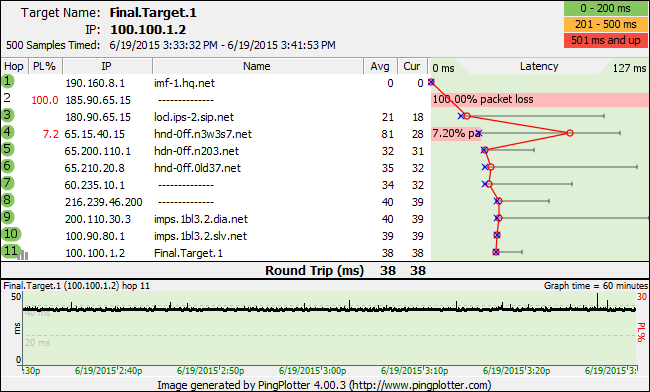
There are numerous reasons why packet loss (as seen in the above screenshot at hops 2 and 4) occurs: Insufficient bandwidth; network connection problems; hardware failure; routing problems; router configuration; and others. Let's talk a bit about what kind of packet loss is probably significant and what kind of packet loss might not be impacting your network experience.
First, it's really important to understand that the only hop that matters is the final destination. If the final hop (your target) is showing 0% packet loss and acceptable latency, then all the hops before that can show all kinds of errors and it doesn't matter. As long as the final destination isn't affected, then all other latency and packet loss is an artifact of router configuration (or similar), and there is no problem.
The only hop that matters is the final destination. If you're happy with the latency and packet loss being seen at the final destination, then none of the other hops matter.
Some servers (and some routers) may specifically block (or down-prioritize) ICMP echo requests or where TTL=0. These routers (or the final destination) might show 100% packet loss or high packet loss and latency.
Now, you may see packet loss or latency at the final destination. If you do, then it's time to look at some of the prior hops to see where this packet loss and/or latency was first introduced. Once you've identified which hop/router is adding packet loss or latency (which is also being seen at the final destination), then you can work on solving the problem at that hop.
Ideally, you want to correlate some less-than-acceptable behavior of some other application to packet loss or latency in PingPlotter. Examples of other application problems: Game Lag, Voice over IP dropouts and bad sound quality, slow web browsing, or temporarily frozen stock tickers. If you can correlate this behavior to periods of packet loss or high latency in PingPlotter, then your data in PingPlotter is probably going to present a really compelling story to the person you need to convince of the problem.
Need interpretation help?
Our new Reader service lets us do the hard troubleshooting work while you do other things with your time.
Learn more