

Knowledge Base
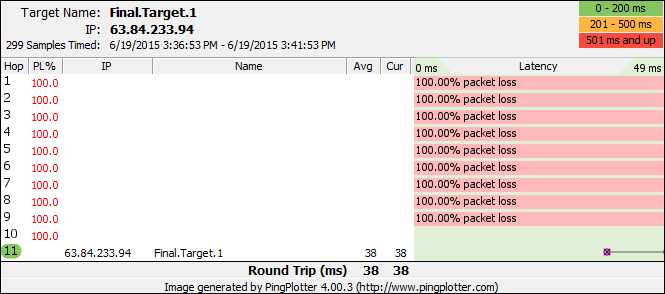
All intermediate hops show 100% packet loss
Question
My route is 11 hops long, but hops 1-10 show 100% packet loss (and no IP Address or DNS Names) and only the final destination shows anything. What's causing this?
Solution
The final destination reports back with an ICMP echo reply, while all the intermediate hops report back with ICMP TTL Expired packets. These different types of packets can be filtered differently by routers and/or firewalls. In the case that you have here, where only the final destination is showing up, it's pretty likely that something very close to your computer is dropping all ICMP TTL Expired packets. Without getting these packets back, there's no way we can determine which router is working at each hop, or what the latency or packet loss is.
Before we dig into the details of this, keep in mind that any time spent getting PingPlotter to report intermediate hops is only helpful if we're seeing packet loss or unreasonable latency at the final destination. Be careful that you don't spend too much time getting PingPlotter working as that just helps you pinpoint the problem - it doesn't actually solve any networking problems you might find.
That said...
The fact that none of the hops are showing up gives us some clue
If you're running a firewall or VPN software of some kind, try disabling that (making sure you don't leave your computer vulnerable to some kind of network attack while doing so). This might require disabling one of the services attached to your network card or
If disabling software changes the behavior, it's possible that there might be an option in that software to allow things to work. We've also heard reports of updating the software version changing things to work (this was particularly the AT&T Network Client VPN software, which has a built-in firewall component).
If you find that this isn't a local PC software issue (which you might also be able to eliminate by using a different computer without some of the possible software components on it), then your next point of possible blockage is your router or local firewall hardware. This might be a DSL modem or some NATing device that serves your local network. This device might have options to block/enable ICMP TTL Expired packets, or it may require a firmware/bios update to get things working.
These same symptoms might appear, but only the first and/or second hops work. If this is the case, then you know it's not your local computer causing the problem.
Known problem firewalls:
- Norton Internet Security 2010 is known to cause this problem. It has a default general rule to block all ICMP inbound and outbound requests. Turn off (uncheck) that rule to enable the full route to show up in PingPlotter.
- If you have a Cisco ASA Firewall, you may need to add an inbound Allow ACL. You can find some background information and instructions here
- If you have a FortiGate Firewall, you may need to create a simple "Permit ICMP Any" ACL. Consult your command manual for information on correct syntax.
(If you have a piece of hardware or software causing this problem, please let us know about it so we can list it here.)