

Knowledge Base
MultiPing as a service with FireDaemon
Question
I'd like to have MultiPing running continuously - even when I'm not logged in. Is this possible?
Solution
MultiPing runs natively as a Microsoft Window application, not as a service. This means that you need to be logged into Windows for MultiPing to monitor targets. There may be cases, however, where you want MultiPing to start automatically when Windows boots, without having to be logged in as a user.
Windows services, are designed to run when Windows boots, and to run without a user interface. This is an ideal way to run a monitoring application that can work without a user interface.
If you want to run MultiPing as a Windows Service, you'll need to enlist the aid of an additional application. There are several tools available that can do this, but one of the most powerful and easy to use is FireDaemon, a handy utility that will enable you to run just about any application as a service.
This article will walk you through the ins and outs of configuring MultiPing for operation as a service using FireDeamon.
Prerequisites:
- Windows XP or newer
- MultiPing 1.0 or higher, installed on your workstation.
- Administrative rights on the installed workstation.
Note: These instructions were created using FireDaemon version 1.7, although other versions should be similar.
FireDaemon Installation
We assume that you already have MultiPing installed on your workstation. You'll also need to have FireDaemon installed. Download it from http://www.firedaemon.com/downloads/ and install it by running the downloaded installer (you'll need to be an administrator for this to work). If you have questions or problems with this step, please consult the FireDaemon documentation and website.
Create a lists of hosts to monitor
Before creating a service, let's create a list of hosts to monitor. This host list is maintained in a MultiPing workspace file - which can be changed at any time to include or exclude hosts.
- Open MultiPing
- Add at least one target that you want to monitor
- Associate the alerts you want working on this target (or targets if you did more than one). See the help file for more details on how to do this.
- Save the workspace in the Default location via the File -> Save Workspace command.
- Turn on the option for "Auto-save and reload default workspace on close / relaunch of MultiPing" (in Edit -> Options, General).
- Set MultiPing to have a tray icon (View -> Put icon in tool tray)
- Close MultiPing
- Test by opening MultiPing and closing it several times - make sure your targets and history come up correctly.
We'll now set up the service to launch MultiPing against this workspace file.
* Make sure you're not getting a MultiPing licensing warning here, or MultiPing won't launch correctly. For best results, you should be using a licensed version of MultiPing.
Configure FireDaemon to launch MultiPing
FireDaemon, by default, will create several shortcuts to launch the 'Service Manager'. You can launch the service manager by either using the desktop shortcut, the Start Menu shortcut, or one of the other shortcuts created by FireDaemon.
- Launch the FireDaemon Service Manager
- Create a new service using the 'Service -> New' menu option.
- Use the following values on the 'Program' tab:
Short Name: MultiPing
Long Name: MultiPing (change this to describe the targets you're monitoring
Executable: (browse to the c:\Program Files\MultiPing\MultiPing.exe)
Working Directory: (use default of c:\Program Files\MultiPing - or MultiPing.exe path)
Parameters: (leave empty)
If you want MultiPing to run minimized (suggested!), add the /minimize parameter (as seen below).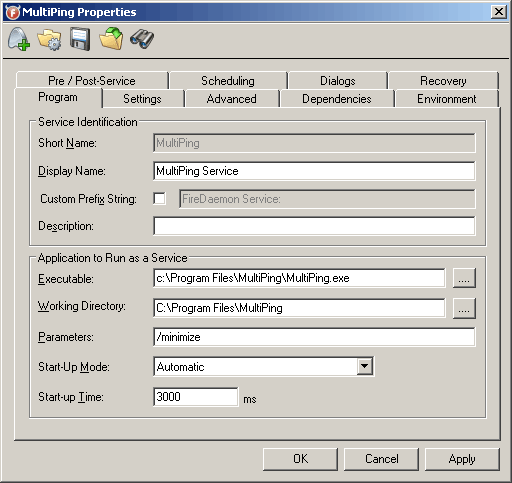
- Change the following values on the 'Settings' tab:
Turn on 'Interact with Desktop'
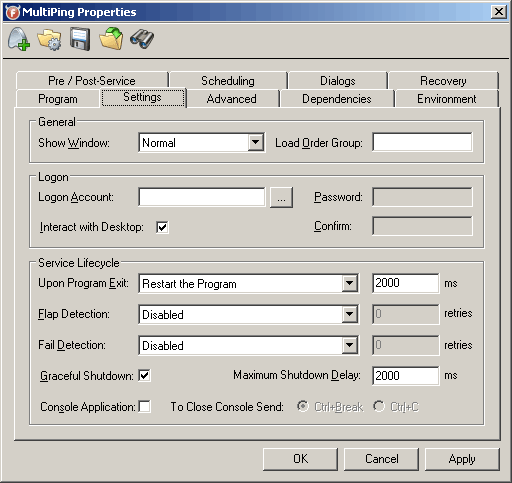
- Hit the 'Apply' button. You should see 'Service 'MultiPing' succesfully installed.
This should get MultiPing started and running.
Changing the list of monitored targets
To change the list of targets you want to monitor, all you need to do is overwrite the workspace file with a new version. You can do this either with the instance of MultiPing that's running as a service, or a separate instance completely. Restarting the service will update MultiPing to monitor the new target list.
Caveats of MultiPing as a service
- When you log off, MultiPing will close and FireDaemon will restart it. Starting with MultiPing version 2.00, the history data will also be reloaded - for any previous version, the history will only show back as far as the last time you logged off.
- If you have a logging alert configured, the system user needs to have rights to create files in the log directory you've specified.
Please let us know if you have success (or problems) using MultiPing with FireDaemon! We'd love to hear your experiences.