











 | |
iSpeed - iRacing HUD and Lap Analyzer | |
 |
iSpeed - iRacing Speed/Split/Best-lap display
Telemetry analysis, datamart, trap speeds, splits ... get it!
You're always looking for another second on the iRacing track, trying to squeeze the last few drops of speed out of every corner and every straight. iSpeed is built to help you do this.
iSpeed can keep vital information in front of you (using visual and audio output) while driving, and will also help you after the fact - finding the best way through a corner, with braking points, lines and cornering speed.
iSpeed runs on your iRacing computer - either quietly or actively, and surfaces data through a wide variety of displays (second computer, iPad, iPod, iPhone, Kindle Fire, second computer, etc).
The lap analyzer and datamart also give you tools to compare your laps with better laps (your own or others) to find the next second.
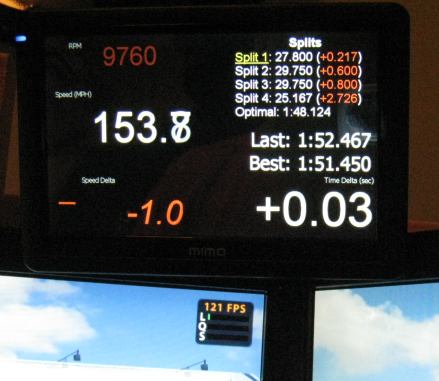
Features (partial list):
- Heads up display of pertinent data.
- Supports second monitors, windowed mode, iPad, iPhone, iPod, Android, Kindle Fire, etc.
- Voice announcements of Splits / Trap Speeds / Lap Times (via Windows Text To Speech)
- Audio announcements of marked track points (can help with braking / cornering points)
- Shows best splits, comparison to best splits, and optimal lap times (thanks, Stephane).
- Shows time delta compared to best lap (or any history lap - yours or someone else's).
- Can show +/- speed and deltas for someone else's lap file - while you're driving.
- Auto-saves your best laps so you can look at them later.
- Auto-saves your best setups so you don't lose your setup tweaks.
- Lap Analyzer to compare your lap with others.
- Includes a "Datamart" with other people's lap files for you to download / compare with your own (many thousands of laps availble to download - right now - to compare yours against).
- Can convert an iRacing .rpy (replay) file to an iSpeed lap file (.irlap) (more details here).
- Customizable split points, via the Lap Analyzer.
- Customizable "Trap Speed" points, via the Lap Analzyer.
- Can "Stay on top" of iRacing running in Windowed mode - important data can be "ripped away" from the main GUI and placed on top of iRacing.
- Supports multiple lap types so your best lap and splits in Hotlap mode can be stored separately from your Race ones.
- Can load save files and looking at user input (brake, throttle, steering angle, gear), drive path, and speed. Since we always save your best laps, this makes it really easy to compare against someone else's laps.
- Works on Windows XP, Vista Window 7 and Windows 8, 32 and 64 bit versions.
Instructions (super-brief version):
- Download the latest build 3.5.4.0, June 13th, 2017, or view the release notes.
- Run the file you just downloaded - it will install iSpeed.
- Launch "iSpeed Telemetry Collection + HUD" from Start -> Programs -> iSpeed.
- Move the window to someplace useful (like a secondary monitor that won't be used for iRacing), or turn on the web interface and pull it up on your iPad.
- Run iRacing. Drive. Get Faster.
- When you're done, load iSpeedLapAnalyzer.exe. Load someone else's lap and compare with yours to see driving input differences (brake points, turn-in point, etc.) and see where you can improve.
- Read Troy Schulz's "Getting Faster, one second at a time" guide - highly recommended.
- If you have comments, problems, questions, please post to the iRacing forum.
Donating
iSpeed is a labor of love, in many senses (and often gets in the way of actual racing!). That said, many features have been added at the request of users, and for that kind of work to continue, there needs to be some incentive to continue working on iSpeed. That's where donations come in to play.
For any user that donates $15.00 or more to iSpeed, you'll get a license key, which disables all the "Please Donate" requests in the software. Using one of the "Money" buttons will automatically generate you a license key. You'll also get priority support and a special email address to use to contact us if you have any questions.

|
Additional documentation
Here's some more information / documentation:
- Web interface, iPhone, etc.
- Telemetry Analysis
- Points of interest (voice announced)
- Saving, Import and Export of Lap files
- Converting an iRacing replay to an iSpeed lap.
- Adjusting iSpeed voice announcement volumes.
- Troy Schulz's "Getting Faster, one second at a time" guide - highly recommended.
Lost your donation / activation key?
Enter the email address you used when you originally donated. Your key will be automatically emailed to that address. If your email address has changed, contact codes@nessoft.com to have this corrected so we can get your license key sent to you.
Shameless plug
We also do network troubleshooting tools. If you're having problems with latency, lag, packet loss and similar, please try PingPlotter. We even have a knowledge base article on how to use PingPlotter with iRacing.

